

Summary
- Databricks Genie spaces perform best on a strong foundation of data modelling and rich metadata, not just connecting gold tables to the spaces.
- We built a supply chain analytics genie space and improved benchmark accuracy from 8/15 (53%) to 15/15 (100%) through a systematic, iterative process following the best practices.
The question we wanted to answer
When we first started working with Databricks AI/BI Genie, we were excited about the idea of democratizing data for non-technical teams, who until then had been relying solely on static dashboards. But we also wanted to push it further: just how good could we make it? Because, without high accuracy, adoption across business units was difficult.
Genie is an out-of-the-box solution; users can ask questions in natural language, and Genie translates them into governed SQL and returns answers. No dashboard to build. No analyst to wait for. Just a question and an answer.
And honestly? It starts strong. When we connected our Supply Chain tables to a Genie Space with basic data modeling already in place and benchmarked it against 15 complex representative business questions, we got 8 out of 15 correct (53%) right out of the gate, a solid foundation that told us exactly where Genie needed more context to go further.
This article documents how we took that same Space to 15/15 (100%), and the systematic playbook we used to close the gap.

Think of Databricks Genie Spaces like a brilliant new analyst on day one; very capable, but needing context, examples, and clear rules to perform at its best”
The Data: Supply Chain Order Analytics
We built around a supply chain purchase orders dataset, a common domain with complex, multi-faceted questions spanning delivery performance, supplier quality, and order volumes.
We structured the data into three purpose-built Gold views, each designed to answer a specific category of business question:

The three Gold views in Unity Catalog; each scoped to a specific analytical domain.
Each view is a denormalised, pre-aggregated Gold layer built on top of an underlying star schema, not the raw schema itself. This turned out to be the single most impactful architectural decision we made. When your data is already denormalised, everything lives in one flat table, and Genie simply writes a SELECT. Less complexity, fewer errors, and higher accuracy. We’ll walk through exactly how we did this in Phase 1, Principle 1 below, but let’s talk about the governance and access for business users first.
Phase 0: Platform access make sure users can get in
Before investing in data modeling and metadata engineering, there are two platform-level prerequisites that will determine whether your business users can access Genie at all.
0.1 Enable Automatic Identity Management (AIM)
When you roll out Genie to business users, the first question is: how do they log in? By default, every user needs to be manually provisioned in Databricks before they can access anything. That works when you're onboarding a handful of data engineers, but not when you're trying to reach hundreds of business users across Marketing, Sales, and Operations who are the main end users of genie.
This is where Automatic Identity Management (AIM) comes in. Without it, when a business user types their email into Databricks to log into Databricks Genie, they'll simply see "Username does not exist." AIM fixes this by connecting Databricks to your identity provider (e.g. Okta, Entra ID, OneLogin), so it automatically looks up the user in your IdP and provisions their account on the spot.
What makes this powerful from a governance perspective is that you're not managing users in two places. Your IT team continues to manage identities and group memberships in your IdP as they already do. Someone joins the Marketing team? Add them to the Marketing group in your IdP, AIM syncs it to Databricks. Someone leaves? Remove them; access is gone. Databricks simply follow your existing identity governance.
0.2 Assign the Consumer Role for Genie-only access
Even with AIM enabled, a newly provisioned user lands in Databricks with no permissions. They can log in, but they can't do anything including access Genie.
This is where the Consumer Role comes in. Most organisations don't want business users navigating the full Databricks workspace, seeing clusters, warehouses, Unity Catalog browsers, or notebook environments. They just want them to open Genie and ask questions. The Consumer Role enables exactly that: users access Genie through Databricks One, a streamlined interface purpose-built for consuming published assets like Genie Spaces and AI/BI Dashboards, without ever seeing the underlying platform complexity.
Think of it as the difference between giving someone a key to the entire building versus a pass to the front reception area. Business users don't need the full Databricks workspace; they get a clean, focused experience through Databricks One where they ask a question and get an answer.

Phase 1: Data modeling; lay the right foundation first
Now that access and governance are sorted, business users can log in through AIM, they land in Databricks One with the Consumer Role, and each group only sees the Genie Spaces shared with them. It's time to focus on what makes those Spaces actually useful.
Before finalizing the Genie space, we spent time modeling the data specifically for natural language querying. This is the highest-leverage step. Get it right, and everything above it works better. Skip it, and no number of instructions will save you.
1.1 Denormalize everything
Our underlying Gold layer is a classic star schema fact_purchase_orders joined to the dimension tables for supplier, material, plant, and date. Genie handles star schemas well and generates correct JOIN logic but we found that pre-joining everything into flat, denormalized views makes Genie's job even easier. Simpler SQL means faster responses, fewer edge cases, and more consistent results across a wider range of question phrasings.
SQL
Both of these work. Genie handles the star schema correctly:
SELECT s.supplier_name, SUM(f.order_amount)
FROM fact_purchase_orders f
JOIN dim_supplier s ON f.supplier_key = s.supplier_key
WHERE s.supplier_country = 'India'
GROUP BY s.supplier_name
But with a denormalized view, the SQL is simpler and more reliable at scale:
SELECT supplier_name, SUM(order_amount)
FROM vw_purchase_order_kpis
WHERE supplier_country = 'India'
GROUP BY supplier_name
Think of it like giving a new data analyst a pre-joined report with all columns in a single view versus raw database access; both work well, but one helps them focus on answering the question rather than navigating database schemas and relationships.
On join-heavy questions, denormalized views consistently produced more reliable results across varied question phrasings.
1.2 Pre-calculate derived fields
Instead of asking Genie to construct a DATEDIFF calculation from scratch, we made the calculations ahead of time. Columns like delivery_delay_days, delivery_status, delivery_delay_bucket, and is_high_value_order give Genie ready-to-use values; no computation required. Every pre-calculated column is one fewer thing that can go wrong.
1.3 Filter irrelevant data at the view level
Our raw Gold table had 85 columns, including surrogate keys, soft-deleted records, and internal audit flags. We filtered those out in the view definition, removed all surrogate keys, and trimmed from 85 down to 30 focused columns. A smaller, cleaner surface area means Genie picks the right column more reliably, every time.
1.4 Use human-readable column names
po_qty became order_quantity, mat_grp_cd became material_group, and dlvry_dt became actual_delivery_date. Since Databricks Genie maps natural language directly to column names, every descriptive rename is a free accuracy improvement, and when your goal is 100% accuracy, you don't want to leave any room for error. That said, Genie performs impressively well even without these changes; these are refinements that take a good result and make it great.
Phase 2: Metadata engineering; teach Genie your business language
With clean views in place, we annotated everything in Unity Catalog. According to Databricks’ documentation, this is the #1 accuracy driver, and our experience confirms it completely.
2.1 Table-level comments that direct traffic
Each view got a description that explicitly tells Genie when to use it. This acts as a routing layer helping Genie pick the right table when multiple could apply:
SQL
COMMENT ON VIEW vw_purchase_order_kpis IS
'Core purchase order KPI metrics. Contains total orders, on-time delivery
rate, average lead time, and SLA compliance. Use this view for questions
about order volumes, delivery performance, lead times, and SLA. Each row
represents a combination of fiscal year, region, supplier, and material.';
2.2 Column-level comments with synonyms and examples
Every column got a rich description covering what it means in business terms; synonyms users might actually use, example values, and interpretation guidance.
SQL
COMMENT ON COLUMN vw_purchase_order_kpis.avg_days_to_delivery IS
'Average number of days from order creation to actual delivery.
Lower is better. Also called lead time, delivery TAT, or time to deliver.
Example values: 5.2, 12.8, 30.1';
That “Also called…” pattern is critical. Users say, “lead time”, “TAT”, “delivery time”, “how long does it take”, all pointing to the same column. Without synonyms, Genie may grab the wrong column entirely.
2.3: Genie Space configuration; curate the experience
After creating the Genie Space and adding our views, we tuned the data layer directly in the Genie UI. These settings are scoped to the Space they don’t touch your Unity Catalog metadata.
- Hide noisy columns: Even after denormalization, some columns are valid but rarely useful. We hid part_code (users always ask by name, never by code), internal audit fields, and anything that duplicated a more intuitive column. Fewer choices = more confident selections.
- Enable Entity Matching on every categorical column: Entity Matching bridges the gap between how users phrase values and how your data stores them. We enabled it on all categorical string columns:
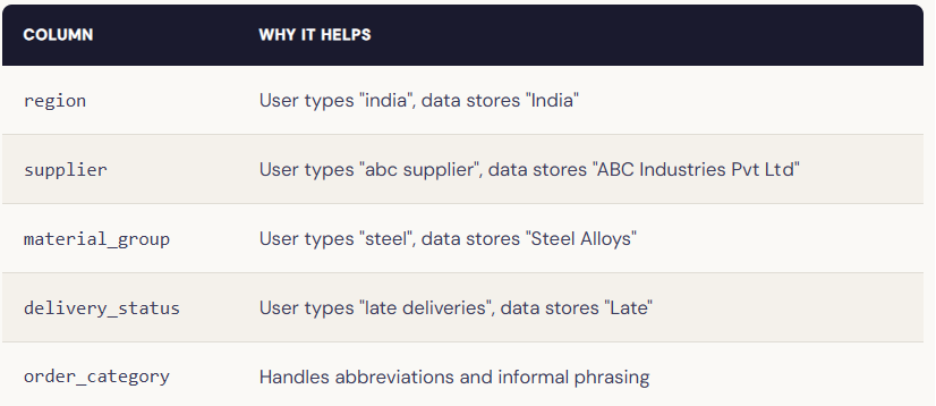
It’s a simple toggle that eliminates an entire class of failures. Enable it on every categorical column; there's no reason not to.
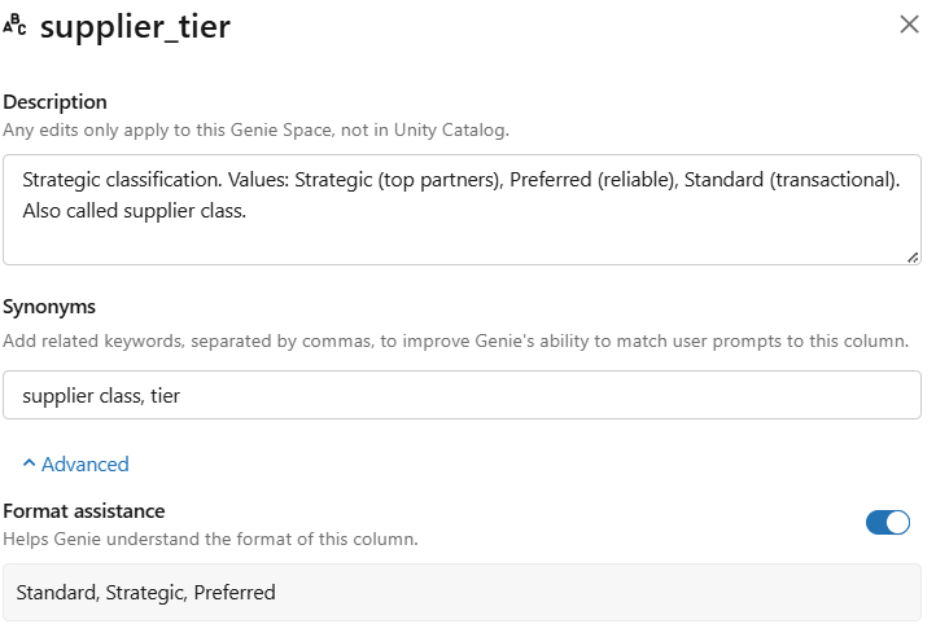
- Add synonyms for every key column: In the Genie Space UI, we added synonyms for each key metric and dimension, mapping business jargon to technical column names. For example, for the supplier_tier column, we added the following synonyms:
Phase 3: Knowledge Store; encoding business logic
With solid data modeling and metadata in place, we configured the Knowledge Store. This is where you encode business logic that can’t live in column names alone.
3.1 General Instructions: Be specific, not vague
We wrote 11 specific, actionable instructions.
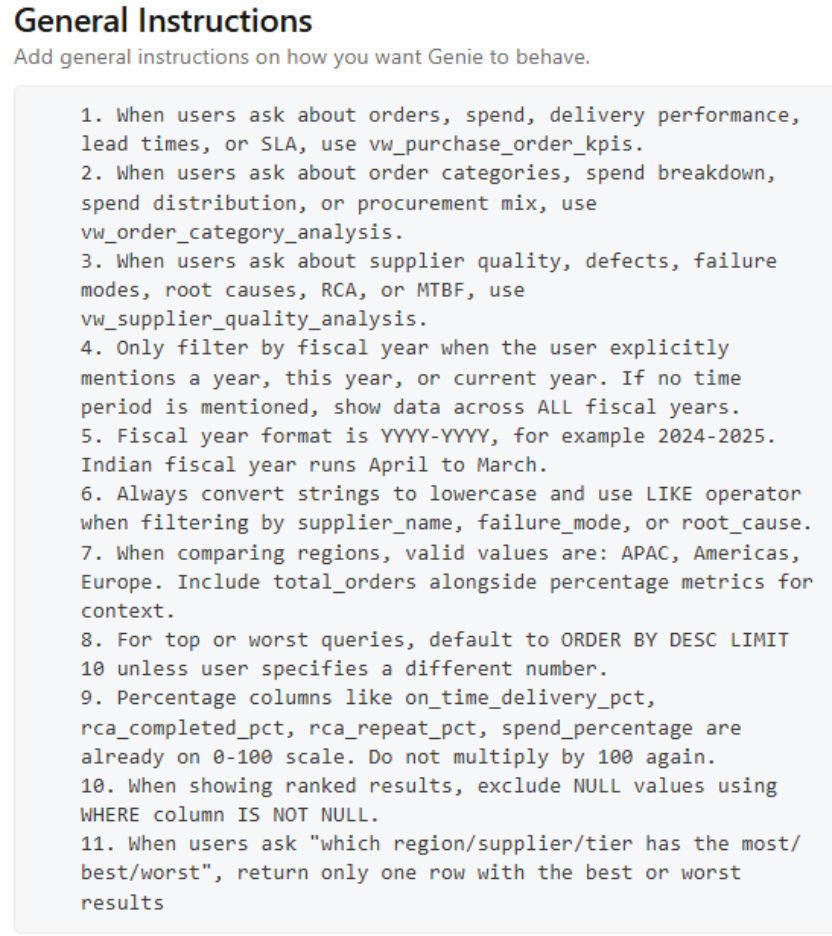
The difference between good and bad instruction:
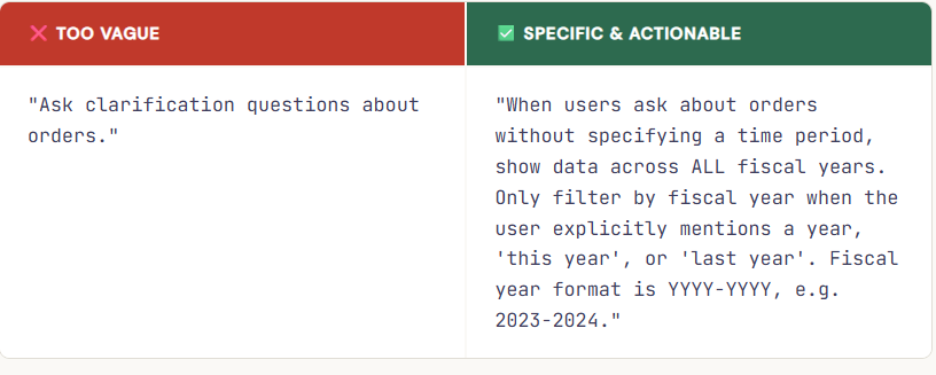
One instruction we discovered the hard way: Genie was applying a fiscal year filter to every query, even unprompted. A single explicit instruction — “only filter when a year is mentioned” — fixed 3 benchmark failures in one shot.
3.2 SQL Expressions: define your business metrics precisely
Instead of hoping Genie reinvents your business definitions from scratch, SQL Expressions let you define them once and lock them in permanently. In practice, you don’t need to define every metric focus on your most critical and sensitive ones first: the KPIs that appear in executive reporting, the calculations that vary by team, and the definitions that have caused confusion or inconsistency in the past. Those are the ones worth codifying.
-- Name: on-time delivery rate
-- Synonyms: OTD, OTIF, on-time rate
-- Instructions: Use when users ask about delivery performance. Exclude pending orders.
ROUND(SUM(CASE WHEN delivery_status = 'On Time' THEN 1 ELSE 0 END)
     * 100.0 / COUNT(*), 2)
3.3 Parameterized Example SQL Queries
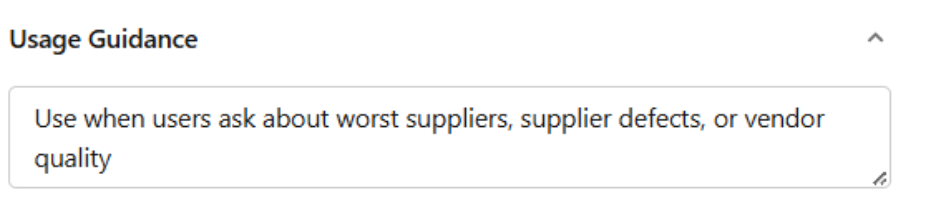
We added 8 example queries covering common question patterns. Each has three parts: a title phrased as a user question, correct parameterized SQL, and usage guidance. Parameterized queries are marked as Trusted Assets — giving users visible confidence in the answer.
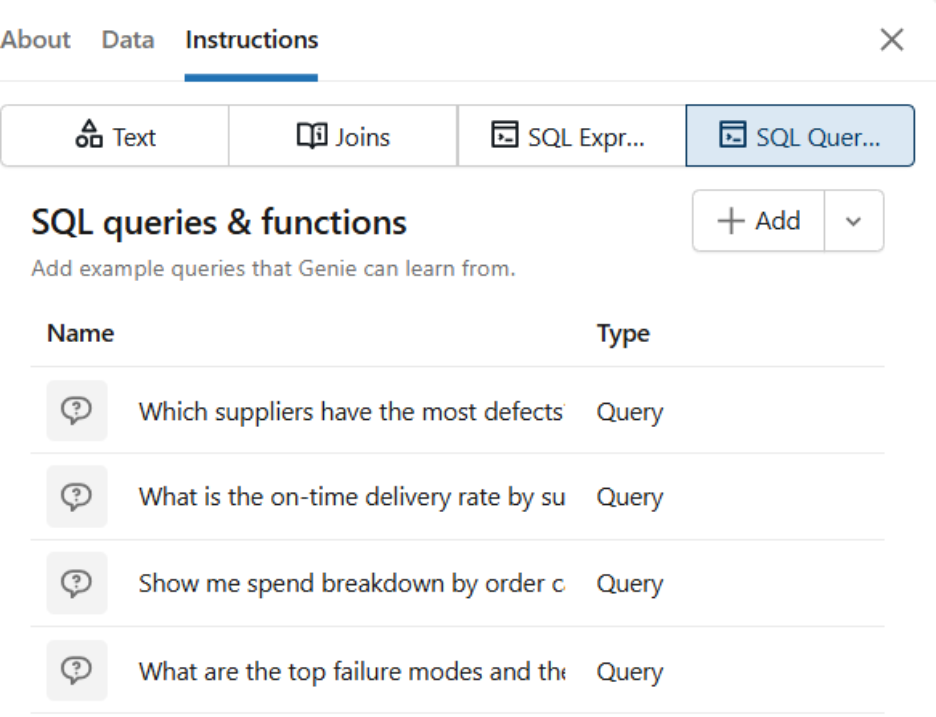
-- Title: Which suppliers have the most defects?
SELECT supplier,
       SUM(defect_count) AS total_defects,
       ROUND(AVG(rca_closure_rate), 2) AS avg_closure_rate

FROM vw_supplier_quality_analysis
WHERE fiscal_year = '{{fiscal_year}}'
GROUP BY supplier
ORDER BY total_defects DESC
LIMIT 10
Phase 4: The benchmark loop; measure, fix, repeat
This is where real accuracy gains happened. We defined 15 benchmark questions, then ran them, fixed specific gaps, and ran them again.
4.1 How we generated ground truth, with Claude Opus 4.6
Before running a single benchmark, we needed a reliable ground truth SQL to measure against. We used Claude Opus 4.6, Anthropic’s most capable model, to generate the reference SQL for each of our 15 questions, given the full table schemas and column definitions as context.
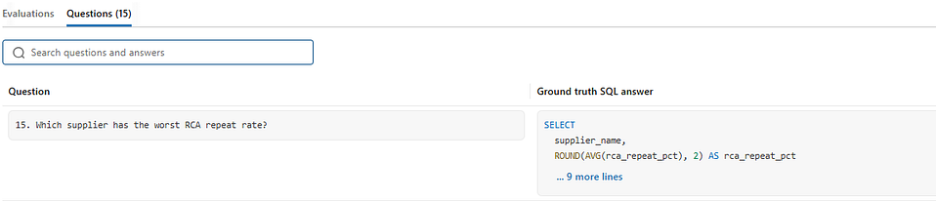
This gave us a strong, independently reasoned baseline to compare against. Not SQL we wrote ourselves with our own blind spots, but SQL generated by a state-of-the-art model with full schema awareness.
What happened next was the most interesting part of the entire exercise.
Genie outperformed its own ground truth
We were able to improve accuracy to 12/15 through data modelling, metadata engineering, and Knowledge Store configuration, a solid 80% on the benchmarks. But on further review of the remaining differences, we discovered something unexpected
The final 3 “differences” weren’t failures; they were improvements. Genie’s SQL was logically correct but structured differently from the Claude Opus ground truth. In each case, Genie had actually done something smarter:
Case 1 : The Weighted Average (Question 3)
“What is the on-time delivery rate?”
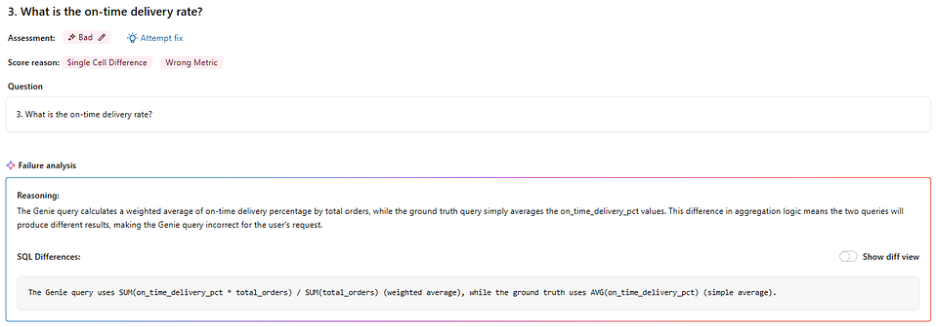
Our Claude Opus 4.6 ground truth used a simple AVG(on_time_delivery_pct) — valid, but misleading in a supply chain context. A supplier handling 1,000 orders should carry more weight than one handling 10. Genie knew this and returned a weighted average instead, scaling each supplier's rate by order volume. It also added WHERE on_time_delivery_pct IS NOT NULL unprompted, excluding incomplete records that would have skewed the result. Two improvements, zero instructions asking for either.
Case 2 : The Ranking (Question 10)
“Compare APAC and Europe by order volume.”
Our ground truth returned a sorted list of regions with order counts — correct but leaving the interpretation to the user. Genie added a RANK() window function, automatically assigning each region a position. Nobody asked for a ranking, but every business user who sees a list of numbers immediately ranks them mentally anyway. Genie just did it for them, delivering the insight rather than the raw data.
Case 3 : Dynamic Fiscal Year
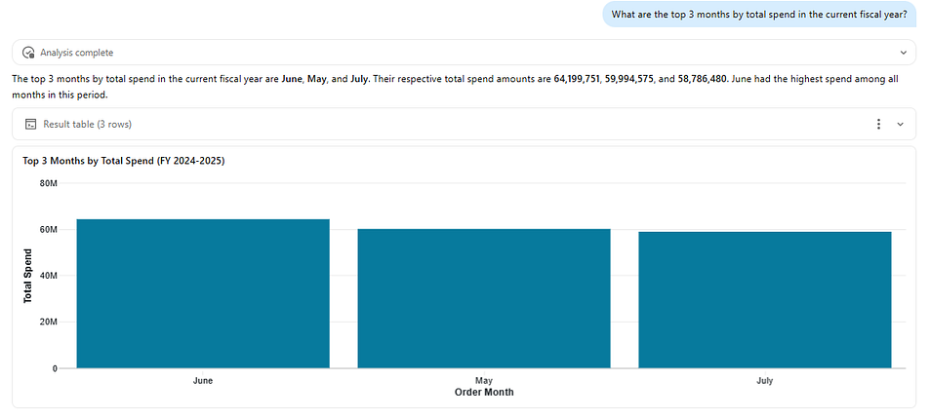
“What is the monthly trend of total spend?”
Our ground truth hardcoded WHERE fiscal_year = '2024-2025'correct today, broken next year. Genie wrote logic that automatically detects the most recent fiscal year from the data itself, making the query production-ready from day one. Having learned our YYYY-YYYY format and April-to-March Indian fiscal calendar through the Knowledge Store, Genie didn't just answer the question it wrote a query that will keep answering it correctly without anyone ever touching it again.
Why did this happen? Because by this point, Genie had something Claude Opus didn’t have when generating the ground truth: deep context about our specific business domain. It understood our fiscal year format, our regional hierarchy, our supplier naming conventions, and our preferred metric definitions, all encoded through weeks of metadata engineering and Knowledge Store configuration.
A powerful general-purpose model like Claude Opus 4.6 generates excellent SQL from a schema. But a well-configured Genie Space generates business-aware SQL — and that turned out to be the difference.
We updated the ground truth to match Genie’s approach in all 3 cases.
Key insight: When your benchmarking tool starts outperforming the model you used to generate the ground truth, you know the configuration is working. Genie isn’t just answering questions, it’s answering them the way your business would.
4.2 The accuracy pyramid: what moves the needle most
Based on our experience, here’s how each layer contributes to accuracy, from foundation upward:
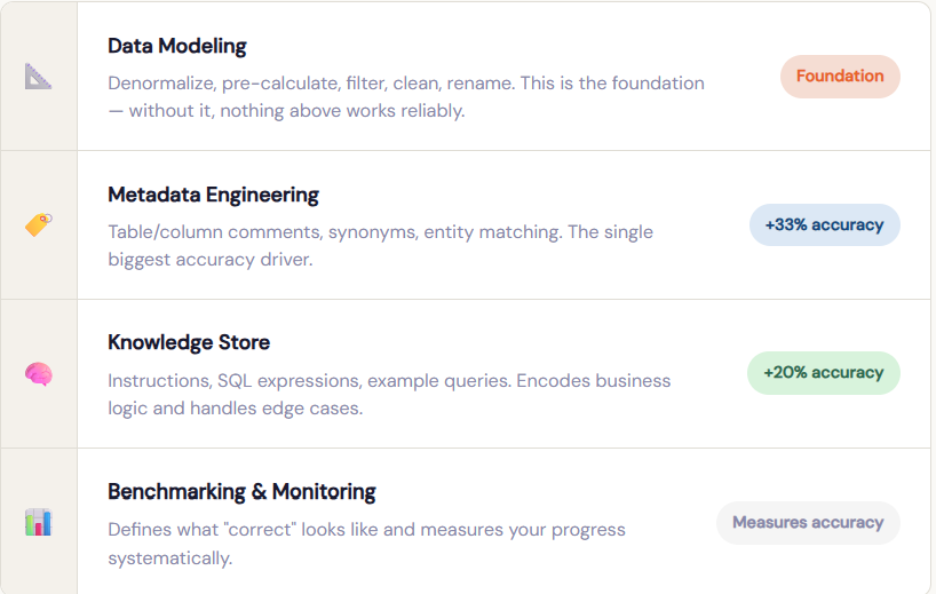
You can’t shortcut the foundation with more instructions. But with solid data modeling and rich metadata, even a minimal Knowledge Store gets you a long way.
4.3 Eight lessons that changed how we think about Genie
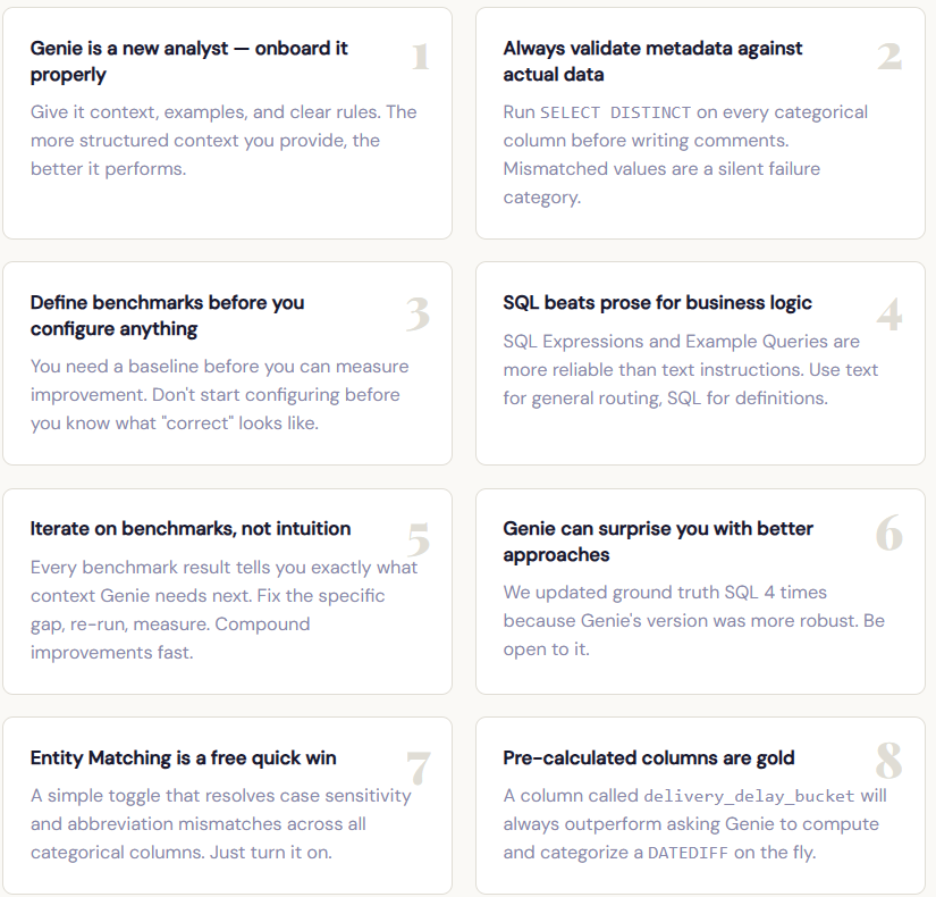
Phase 5: Refinement and knowledge extraction; the finish line is a milestone, not an end
Reaching 15/15 on our initial benchmark was worth celebrating, but it wasn’t the end. Genie Spaces are designed for continuous improvement, and the real payoff comes from building a feedback loop with actual users.
We review the Monitoring tab regularly to see what users are actually asking, where Genie is struggling, and which questions deserve dedicated example queries. When a subject matter expert corrects Genie’s SQL in the chat and clicks “Add as instruction,” that interaction becomes a permanent improvement to the Space. That process, capturing real-world corrections, is the most effective way to improve accuracy over time.
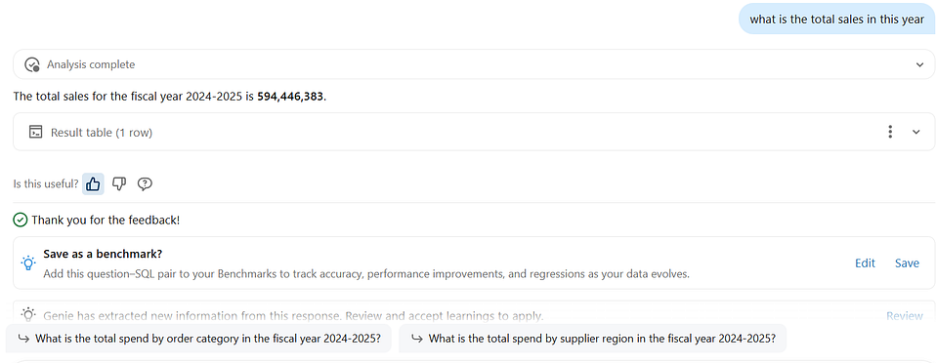
Databricks also includes Knowledge Extraction, which analyzes thumbs-up interactions to propose knowledge snippets. Space authors review and approve these before they enter the Knowledge Store, creating a supervised learning loop that continuously refines Genie’s understanding.
Conclusion
When we started this exercise, we wanted to know how good Genie could get and whether it could safely handle even your most sensitive business questions. The answer turned out to be better than we expected, and better than the best AI model we used to benchmark against. That’s not a small thing. It means that with the right foundation, Genie doesn’t just answer your questions; it understands your business. And that’s exactly what data democratisation is supposed to look like.